


[Mar-2025] Paloalto Network Security Administrator PCNSA Exam Practice Test Questions Dumps Bundle!
2025 Updated PCNSA PDF for the PCNSA Tests Free Updated Today!
Prerequisites for Taking PCNSA Exam
According to the information on the vendor’s website, there are no prerequisites to enroll for the PCNSA test. However, it’s recommended that you attend the Firewall Essentials: Configuration and Management (EDU-210) class prior to sitting for the official validation.
NEW QUESTION # 21
What are three characteristics of the Palo Alto Networks DNS Security service? (Choose three.)
- A. It requires a valid URL Filtering license.
- B. It requires an active subscription to a third-party DNS Security service.
- C. It requires a valid Threat Prevention license.
- D. It uses techniques such as DGA/DNS tunneling detection and machine learning
- E. It enables users to access real-time protections using advanced predictive analytics.
Answer: C,D,E
Explanation:
DNS Security subscription enables users to access real-time protections using advanced predictive analytics. When techniques such as DGA/DNS tunneling detection and machine learning are used, threats hidden within DNS traffic can be proactively identified and shared through an infinitely scalable cloud service. Because the DNS signatures and protections are stored in a cloud-based architecture, you can access the full database of ever-expanding signatures that have been generated using a multitude of data sources. This list of signatures allows you to defend against an array of threats using DNS in real-time against newly generated malicious domains. To combat future threats, updates to the analysis, detection, and prevention capabilities of the DNS Security service will be available through content releases. To access the DNS Security service, you must have a Threat Prevention license and DNS Security license.
NEW QUESTION # 22
Palo Alto Networks firewall architecture accelerates content inspection performance while minimizing latency using which two components? (Choose two.)
- A. Parallel Processing Hardware
- B. Policy Engine
- C. Network Processing Engine
- D. Single Stream-based Engine
Answer: A,D
NEW QUESTION # 23
In which three places on the PAN-OS interface can the application characteristics be found? (Choose three.)
- A. ACC tab > Global Filters
- B. Policies tab > Security
- C. Objects tab > Applications
- D. Objects tab > Application Filters
- E. Objects tab > Application Groups
Answer: C,D,E
Explanation:
The application characteristics can be found in three places on the PAN-OS interface: Objects tab > Application Filters, Objects tab > Application Groups, and Objects tab > Applications. These places allow you to view and manage the applications and application groups that are used in your Security policy rules. You can also create custom applications and application filters based on various attributes, such as category, subcategory, technology, risk, and behavior1. Some of the characteristics of these places are:
Objects tab > Application Filters: An application filter is a dynamic object that groups applications based on specific criteria. You can use an application filter to match multiple applications in a Security policy rule without having to list them individually. For example, you can create an application filter that includes all applications that have a high risk level or use peer-to-peer technology.
Objects tab > Application Groups: An application group is a static object that groups applications based on your custom requirements. You can use an application group to match multiple applications in a Security policy rule without having to list them individually. For example, you can create an application group that includes all applications that are related to a specific business function or project.
Objects tab > Applications: An application is an object that identifies and classifies network traffic based on App-ID, which is a technology that uses multiple attributes to identify applications. You can use an application to match a specific application in a Security policy rule and control its access and behavior. For example, you can use an application to allow web browsing but block file sharing or social networking.
References: Objects, [Application Filters], [Application Groups], [Applications], Updated Certifications for PAN-OS 10.1, Palo Alto Networks Certified Network Security Administrator (PAN-OS 10.0) or [Palo Alto Networks Certified Network Security Administrator (PAN-OS 10.0)].
NEW QUESTION # 24
Which policy set should be used to ensure that a policy is applied just before the default security rules?
- A. Local Firewall policy
- B. Child device-group post-rulebase
- C. Shared post-rulebase
- D. Parent device-group post-rulebase
Answer: C
Explanation:
The policy set that should be used to ensure that a policy is applied just before the default security rules is the shared post-rulebase. The shared post-rulebase is a set of Security policy rules that are defined on Panorama and apply to all firewalls or device groups. The shared post-rulebase is evaluated after the local firewall policy and the child device-group post-rulebase, but before the default security rules. The shared post-rulebase can be used to enforce common security policies across multiple firewalls or device groups, such as blocking high-risk applications or traffic1. References: Security Policy Rule Hierarchy, Security Policy Rulebase, Certifications - Palo Alto Networks, Palo Alto Networks Certified Network Security Administrator (PAN-OS 10.0) or [Palo Alto Networks Certified Network Security Administrator (PAN-OS 10.0)].
NEW QUESTION # 25
In the example security policy shown, which two websites would be blocked? (Choose two.)
- A. Facebook
- B. YouTube
- C. Amazon
- D. LinkedIn
Answer: A,D
NEW QUESTION # 26
The Net Sec Manager asked to create a new Firewall Operator profile with customized privileges.
In particular, the new firewall operator should be able to:
Check the configuration with read-only privilege for LDAP, RADIUS, TACACS+, and SAML as Server profiles to be used inside an Authentication profile.
The firewall operator should not be able to access anything else.
What is the right path m order to configure the new firewall Administrator Profile?
- A. Device > Admin Roles > Add > Web UI > Device > Server Profiles
Device > Admin Roles > Add > Web UI > disable access to everything else - B. Device > Admin Roles > Add > Web UI > Device > Authentication Profile Device > Admin Roles > Add > Web UI > disable access to everything else
- C. Device > Admin Roles > Add > Web UI > Objects > Server Profiles
Device > Admin Roles > Add > Web UI > disable access to everything else - D. Device > Admin Roles > Add >Web UI > Objects > Authentication Profile Device > Admin Roles > Add > Web UI > disable access to everything else
Answer: A
NEW QUESTION # 27
Which administrative management services can be configured to access a management interface?
- A. HTTPS, SSH telnet SNMP
- B. SSH: telnet HTTP, HTTPS
- C. HTTPS, HTTP. CLI, API
- D. HTTP, CLI, SNMP, HTTPS
Answer: C
Explanation:
https://docs.paloaltonetworks.com/pan-os/8-1/pan-os-admin/firewall-administration/management-interfaces You can use the following user interfaces to manage the Palo Alto Networks firewall:
Use the Web Interface to perform configuration and monitoring tasks with relative ease. This graphical interface allows you to access the firewall using HTTPS (recommended) or HTTP and it is the best way to perform administrative tasks.
Use the Command Line Interface (CLI) to perform a series of tasks by entering commands in rapid succession over SSH (recommended), Telnet, or the console port. The CLI is a no-frills interface that supports two command modes, operational and configure, each with a distinct hierarchy of commands and statements. When you become familiar with the nesting structure and syntax of the commands, the CLI provides quick response times and administrative efficiency.
Use the XML API to streamline your operations and integrate with existing, internally developed applications and repositories. The XML API is a web service implemented using HTTP/HTTPS requests and responses.
Use Panorama to perform web-based management, reporting, and log collection for multiple firewalls.
The Panorama web interface resembles the firewall web interface but with additional functions for centralized management.
NEW QUESTION # 28
Which three Ethernet interface types are configurable on the Palo Alto Networks firewall? (Choose three.)
- A. Virtual Wire
- B. Tap
- C. Layer 3
- D. Dynamic
- E. Static
Answer: A,B,C
Explanation:
Palo Alto Networks firewalls support three types of Ethernet interfaces that can be configured on the firewall:
virtual wire, tap, and layer 31. These interface types determine how the firewall processes traffic and applies security policies. Some of the characteristics of these interface types are:
Virtual Wire: A virtual wire interface allows the firewall to transparently pass traffic between two network segments without modifying the packets or affecting the routing. The firewall can still apply security policies and inspect the traffic based on the source and destination zones of the virtual wire2.
Tap: A tap interface allows the firewall to passively monitor traffic from a network switch or router without affecting the traffic flow. The firewall can only receive traffic from a tap interface and cannot send traffic out of it. The firewall can apply security policies and inspect the traffic based on the source and destination zones of the tap interface3.
Layer 3: A layer 3 interface allows the firewall to act as a router and participate in the network routing. The firewall can send and receive traffic from a layer 3 interface and apply security policies and inspect the traffic based on the source and destination IP addresses and zones of the interface4.
References: Ethernet Interface Types, Virtual Wire Interfaces, Tap Interfaces, Layer 3 Interfaces, Updated Certifications for PAN-OS 10.1, [Palo Alto Networks Certified Network Security Administrator (PAN-OS
10.0)] or [Palo Alto Networks Certified Network Security Administrator (PAN-OS 10.0)].
NEW QUESTION # 29
Based on the security policy rules shown, ssh will be allowed on which port?
- A. 0
- B. 1
- C. 2
- D. 3
Answer: C
NEW QUESTION # 30
Which two security profile types can be attached to a security policy? (Choose two.)
- A. DDoS protection
- B. vulnerability
- C. threat
- D. antivirus
Answer: B,D
NEW QUESTION # 31
How does an administrator schedule an Applications and Threats dynamic update while delaying installation of the update for a certain amount of time?
- A. Disable automatic updates during weekdays
- B. Configure the option for "Threshold"
- C. Automatically "download only" and then install Applications and Threats later, after the administrator approves the update
- D. Automatically "download and install" but with the "disable new applications" option used
Answer: B
Explanation:
Schedule content updates so that they download-and-install automatically. Then, set a Threshold that determines the amount of time the firewall waits before installing the latest content. In a mission-critical network, schedule up to a 48 hour threshold.
https://docs.paloaltonetworks.com/pan-os/9-1/pan-os-admin/software-and-content-updates/best- practices-for-app-and-threat-content-updates/best-practices-mission-critical#id184AH00L078
NEW QUESTION # 32
Drag and Drop Question
Match the cyber-attack lifecycle stage to its correct description.
Select and Place:
Answer:
Explanation:
NEW QUESTION # 33
Based on the security policy rules shown, ssh will be allowed on which port?
- A. same port as ssl and snmpv3
- B. the default port
- C. any port
- D. only ephemeral ports
Answer: B
NEW QUESTION # 34
Which two components are utilized within the Single-Pass Parallel Processing architecture on a Palo Alto Networks Firewall? (Choose two.)
- A. App-ID
- B. Layer-ID
- C. User-ID
- D. QoS-ID
Answer: A,C
Explanation:
Explanation/Reference: http://www.firewall.cx/networking-topics/firewalls/palo-alto-firewalls/1152-palo-alto-firewall-single- pass-parallel-processing-hardware-architecture.html
NEW QUESTION # 35
What do dynamic user groups you to do?
- A. create a QoS policy that provides auto-remediation for anomalous user behavior and malicious activity
- B. create a dynamic list of firewall administrators
- C. create a policy that provides auto-remediation for anomalous user behavior and malicious activity
- D. create a policy that provides auto-sizing for anomalous user behavior and malicious activity
Answer: C
Explanation:
https://docs.paloaltonetworks.com/pan-os/9-1/pan-os-new-features/user-id-features/dynamic-user-groups#:~:text
NEW QUESTION # 36
Review the Screenshot: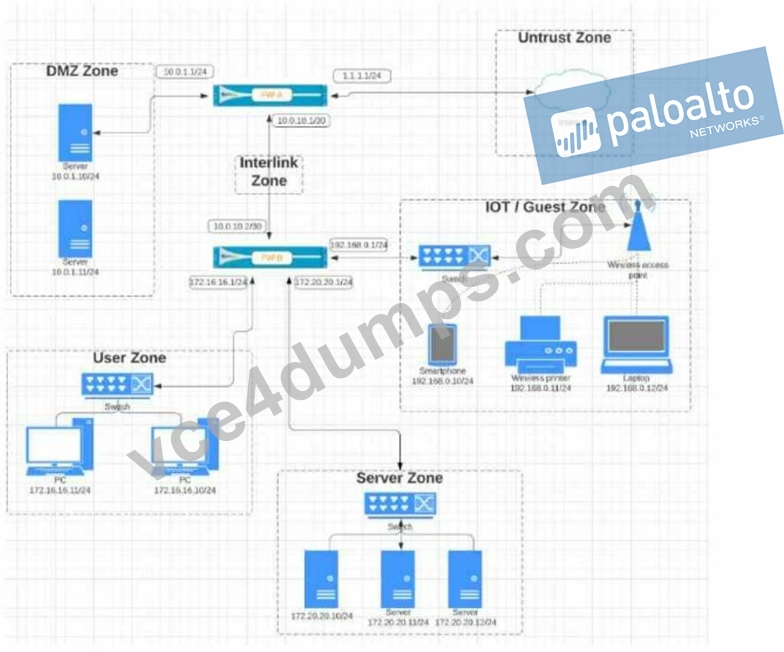
Given the network diagram, traffic must be permitted for SSH and MYSQL from the DMZ to the SERVER zones, crossing two firewalls. In addition, traffic should be permitted from the SERVER zone to the DMZ on SSH only.
Which rule group enables the required traffic?
- A.

- B.

- C.

- D.

Answer: A
Explanation:
Option B enables the required traffic by allowing SSL and web-browsing from UNTRUST to DMZ, denying SSH from UNTRUST to DMZ, allowing MYSQL from DMZ to SERVER, and allowing SSH from SERVER to DMZ. Option A allows SSH from UNTRUST to DMZ, which is not required. Option C denies all the required traffic. Option D denies all traffic from UNTRUST to TRUST, which is irrelevant to the question
https://www.paloaltonetworks.com/services/education/palo-alto-networks-certified-network-security-administrator
NEW QUESTION # 37
Which statement is true about Panorama managed devices?
- A. Local configuration locks prohibit Security policy changes for a Panorama managed device
- B. Security policy rules configured on local firewalls always take precedence
- C. Local configuration locks can be manually unlocked from Panorama
- D. Panorama automatically removes local configuration locks after a commit from Panorama
Answer: C
Explanation:
Explanation
Explanation/Reference:
Reference:
https://docs.paloaltonetworks.com/panorama/9-1/panorama-admin/administer-panorama/manage- locks-forrestricting-configuration-changes.html
NEW QUESTION # 38
Which two options does the firewall use to dynamically populate address group members? (Choose two.)
- A. Tag-based filters
- B. IP Addresses
- C. Tags
- D. MAC Addresses
Answer: A,C
Explanation:
A dynamic address group populates its members dynamically using look ups for tags and tag-based filters.
Tags are metadata elements or attribute-value pairs that are registered for each IP address. Tag-based filters use logical and and or operators to match the tags and determine the membership of the dynamic address group. For example, you can create a dynamic address group that includes all IP addresses that have the tags
"web-server" and "linux". You can also use static tags as part of the filter criteria. References: Policy Object:
Address Groups, Use Dynamic Address Groups in Policy, Statics vs. Dynamic Address Objects Groups
NEW QUESTION # 39
......
Fully Updated Dumps PDF - Latest PCNSA Exam Questions and Answers: https://www.vce4dumps.com/PCNSA-valid-torrent.html
100% Free PCNSA Exam Dumps to Pass Exam Easily: https://drive.google.com/open?id=1NKjlgSJJaQeHys9klgE5Zc6RU0MSgb7u